Why I Like Small Keyboards
I use my keyboards a lot, my job as a software engineer involves quite a lot of typing, I also spend quite a lot of my spare time in front of a computer. I’ve been daily driving small keyboards for a while and have been enjoying doing so. Here’s a bit about which keyboards and why I like them.
I built my first keyboard in 2014, a 44 key Atreus. I used my school’s laser cutter to cut sheets of clear acrylic for the case, hand-wired all the keys and diodes to a microcontroller board, and made liberal use of a hot glue gun. I spent a good while learning the layout, which was made more difficult by the blank key caps I’d chosen – mostly because they were the cheapest available. I kept using it for a while but would increasingly switch back to a more standard 60%1 board, I was playing a lot of DotA at the time which was tricky with the smaller keyboard, until the Atreus just stayed in the drawer.
In 2020 I found out about the Corne keyboard, a 42 key split keyboard. I also got my first software job at around the same time which felt like a good excuse for a new keyboard, so got to work ripping apart the old Atreus for its switches and key caps, and since custom PCBs have gotten a lot cheaper I could get both a nice tidy circuit board as well as a sort of case made the same way2. Both the improved ergonomics of the split layout and me having less time for and interest in DotA meant the Corne stuck around. I also find the 3x6 layout and 3 thumb keys per side much more comfortable than the Atreus’ 4x5 layout with one thumb key.
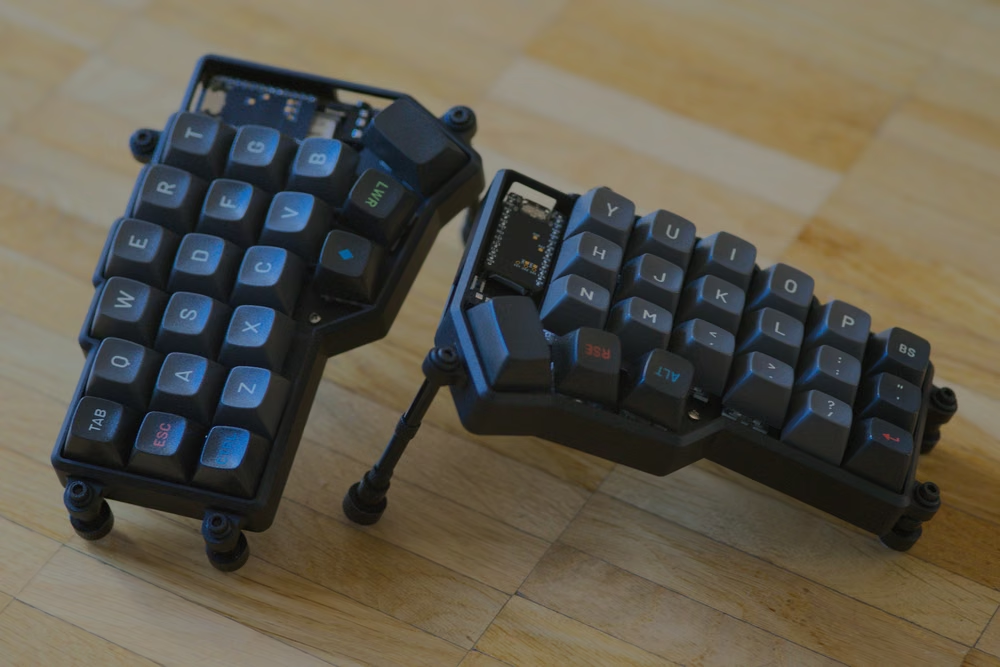
One of my later Cornes
The argument I most commonly see against small keyboards is something along the lines of “I’m a programmer, I need access to all those symbols” or “I use the function keys all the time”. To me this argument seems backwards, you want the keys you use the most to be as close to the home row as possible, meaning that you don’t need to move your entire hand to reach them.
For example, to press the opening bracket ( key, something I’ve been doing a lot of since I started writing Clojure professionally last year, on a standard keyboard you hold the shift key with your pinky and then reach two rows up from the home row to press the 9 key. To do the same on my Corne, I hold the lower key with my left thumb to activate the lower layer, and then press the o key just one row away from home with my right ring finger, which is much more comfortable.
Or as another example, instead of having to reach three rows up from the home row to the function row, which for me means moving my entire hand, with my corne I simply hold the raise key to activate the upper layer and then I have access to all of the function keys easily.
The big downside to using a keyboard like this is learning where all these keys are, particularly the ones you don’t use very often. Having the symbols and function keys you do use often available on another layer close to the home row is great, but for the keys you don’t use often it’s nice to be able to look down and just see that key, reach over and press it. Standard keyboards optimise for accessibility and ease of use, having more keys means it’s easier to know where to find everything. A smaller keyboard makes more sense for those willing to learn the layout in order to type more efficiently3.
Some people take this idea further, with 36 key keyboards that eschew the outer most column of keys to reduce the burden on the pinkies. There are tricks to get more utility out of the most accessible keys, like using home row modifiers. I haven’t tried going that far yet but it is interesting – I have found 42 keys to be a sweet spot giving both the benefits I’ve explained above, as well as being similar enough to a standard keyboard that it hasn’t impacted my ability to type on anything else.
Keyboards are often sized using percentages. A standard full sized keyboard has just over 100 keys, so the percentage reflects roughly how many keys the board has. ↩︎
I say sort of case because it was just a top plate and base plate made like circuit boards just without any actual circuits printed on them. The sides were left open. ↩︎
I’m not someone that’s typing numbers into a spreadsheet all day but for those people that are a numpad is useful. If I needed one I would add a dedicated numpad next to my small keyboard, rather than switch back to full size. ↩︎