Paperless cloud backups
I store all of my important (and many not so important) documents in my Paperless-ngx instance running on my homelab. Given this importance, I wanted to add an additional backup of my documents and the metadata. Having them in cloud storage, while not ideal for privacy reasons, would also give me a way to access the documents easily if I am unable to directly for whatever reason.
Skip ahead to see the config for scheduled backups or backup on change.
I chose to use Dropbox for my backups, because I have a lot of space available from sending invites years ago, and I have it synced onto my laptop which then gives me an additional backup there too. The methods below could also easily be applied to other cloud storage solutions.
My initial instinct on how to solve this was to just run the dropbox daemon on my homelab and create a symlink to wherever paperless stores my documents. I quickly found that this wouldn’t work for a couple of reasons:
- The dropbox daemon doesn’t run on Arm, and my homelab is a Raspberry Pi.
- Paperless doesn’t store metadata in a way that’s easy to backup.
To solve 1., I spent sometime looking into dropbox sync scripts that do work on the Pi, and then writing my own script to do the same thing, but I wasn’t happy with any of these. It didn’t take too much of this research before I was reminded of the existance of Rclone, which is much more robust than any of these scripts and allows me to do a one way sync, which is ideal for my backup. It does bring a new problem to solve, which is that Rclone doesn’t run as a daemon, it needs to be triggered somehow to sync.
The solution to 2. is the Paperless document exporter script. This is Paperless’ recommended backup solution, it does provide all of the metadata and there’s an equivalent import script should the backup need to be restored. Perfect, almost. This has the same issue as Rclone, in that it needs to be triggered somehow.
So now we have two scripts that need to be run in sequence, frequently enough such that my backup is kept sufficiently up to date. And I guess now is the time to mention that I’m running Paperless in docker and intend to keep using the supplied image, so the backup should happen in my docker compose file.
Scheduled backups
A simple timed schedule is a classic way to run backups, so that’s what I went with initially. Using the official Rclone docker image and Ofelia to trigger the document export and then Rclone sync. Below is an abbreviated docker compose file with hourly backups added. The full version is available here, but if you plan to use this I recommend basing yours on a more up to date compose file from Paperless.
services:
  broker: ...
  db: ...

  webserver:
    ...
    volumes:
      - export:/usr/src/paperless/export
      ...
    labels:
      ofelia.enabled: "true"
      ofelia.job-exec.export-job.schedule: "@hourly"
      ofelia.job-exec.export-job.command: "document_exporter --no-thumbnail ../export"

  rclone:
    container_name: rclone
    image: rclone/rclone:latest
    profiles: ["rclone"]
    volumes:
      - export:/data
      - ./rclone/config:/root/.config/rclone
    labels:
      ofelia.enabled: "true"
    command: "copy /data <remote:location>"

  ofelia:
    image: mcuadros/ofelia:latest
    restart: unless-stopped
    depends_on:
      - webserver
    command: daemon --docker
    volumes:
      - /var/run/docker.sock:/var/run/docker.sock:ro
    labels:
      # backup job is run 5 minutes after the hour to give the export time to run
      ofelia.job-run.backup.schedule: "0 5 * * * *"
      ofelia.job-run.backup.container: "rclone"

volumes:
  export:
To set up the rclone remote, run the following and follow the wizard
$ docker compose run -ti --entrypoint="rclone config" rclone
and replace <remote:location> with the name you gave your remote and the
folder where you want your backup to live, I use dropbox:paperless. Dropbox
isn’t the only option, rclone can sync with many different cloud storage
providers, details of which are available on their docs
page.
Rather than figure out running Rclone once the document exporter has finished, I just set it to run 5 minutes later, which works well enough. I used this setup for around 6 months with no issues.
However, I don’t actually update documents in Paperless that often, maybe once or twice a week, so it feels unnecessary to run the backups every hour but then I don’t want to leave documents un-backed up for too long. Ideally the backups could be triggered when I actually do something in Paperless.
Backup on change
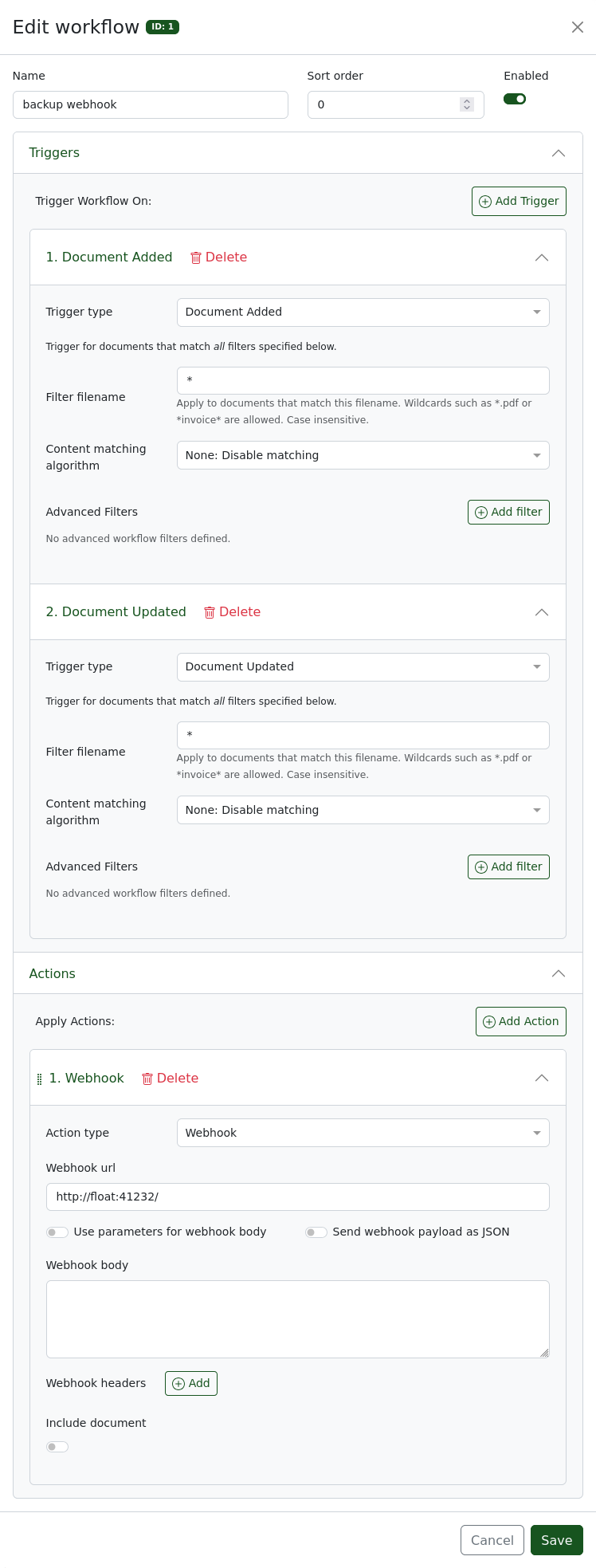
Paperless provides the ability to send webhooks on document addition and update, as part of their workflows feature, so my next idea is using this to trigger the document export and sync job instead of doing it hourly. To do this I created float. The idea of float is essentially to provide similar functionality to Ofelia, but triggered by webhooks instead of on a schedule.
services:
  broker: ...
  db: ...
  webserver:
    ...
    volumes:
      - export:/usr/src/paperless/export
      ...

  rclone:
    container_name: rclone
    image: rclone/rclone:latest
    profiles: ["rclone"]
    volumes:
      - export:/data
      - ./rclone/config:/config/rclone
    command: "copy /data <remote:location>"

  float:
    container_name: float
    image: ghcr.io/sams96/float:latest
    ports:
      - "41232:41232"
    volumes:
      - /var/run/docker.sock:/var/run/docker.sock:ro
    environment:
      FLOAT_CMD: "docker exec -d paperless-webserver document_exporter /usr/src/paperless/export && docker start rclone"

volumes:
  export:
The same rclone set up as above is needed, and then you will need to create a workflow in paperless to send the webhook, I have included a screenshot below to show the settings I use.
Float will debounce the requests to avoid running a backup on every change. The
default debounce duration is 15 minutes, and this can be configured with the
environment variable FLOAT_DEBOUNCE_TIME, which uses duration strings from
Go’s time package, which are specified
as such:
A duration string is a possibly signed sequence of decimal numbers, each with optional fraction and a unit suffix, such as “300ms”, “-1.5h” or “2h45m”. Valid time units are “ns”, “us” (or “µs”), “ms”, “s”, “m”, “h”.
On float
The source code for float is very short so I’m just going to include it in full below. Rather than use the docker API and labels like Ofelia, I decided to just pass in a command to run, and base the container on the docker base image, which gives the container access to docker.
I do think Ofelia’s label based configuration is much nicer though, so if I get some more motivation to work on float copying that would be one of the improvements I would make. I would also like it to handle multiple commands with independant webhooks and debounce timers, but I haven’t had the need for that.
package main

import (
	"log"
	"net/http"
	"os"
	"os/exec"
	"sync"
	"time"
)

var debounceDefault = 15 * time.Minute

func main() {
	debounceStr := os.Getenv("FLOAT_DEBOUNCE_TIME")
	debounceDur, err := time.ParseDuration(debounceStr)
	if err != nil {
		log.Println("Failed to parse debounce duration; using default of", debounceDefault.String())
		debounceDur = debounceDefault
	}

	c := os.Getenv("FLOAT_CMD")
	debounced := debouncer(debounceDur, func() {
		cmd := exec.Command("/bin/sh", "-c", c)
		cmd.Stdout, cmd.Stderr = log.Writer(), log.Writer()
		err := cmd.Run()
		if err != nil {
			log.Println(err)
		}
	})

	log.Println("float started with debounce duration:", debounceDur.String(), "command:", c)
	log.Fatal(http.ListenAndServe("0.0.0.0:41232",
		http.HandlerFunc(func(w http.ResponseWriter, r *http.Request) {
			log.Println("request received")
			debounced()
			w.WriteHeader(http.StatusNoContent)
		})),
	)
}

// credit to https://github.com/bep/debounce
func debouncer(after time.Duration, f func()) func() {
	d := &struct {
		mu    sync.Mutex
		after time.Duration
		timer *time.Timer
	}{
		after: after,
	}

	return func() {
		d.mu.Lock()
		defer d.mu.Unlock()

		if d.timer != nil {
			d.timer.Reset(d.after)
			return
		}

		d.timer = time.AfterFunc(d.after, f)
	}
}